The Arden Digest — Sep 17, 2026
A curated digest.
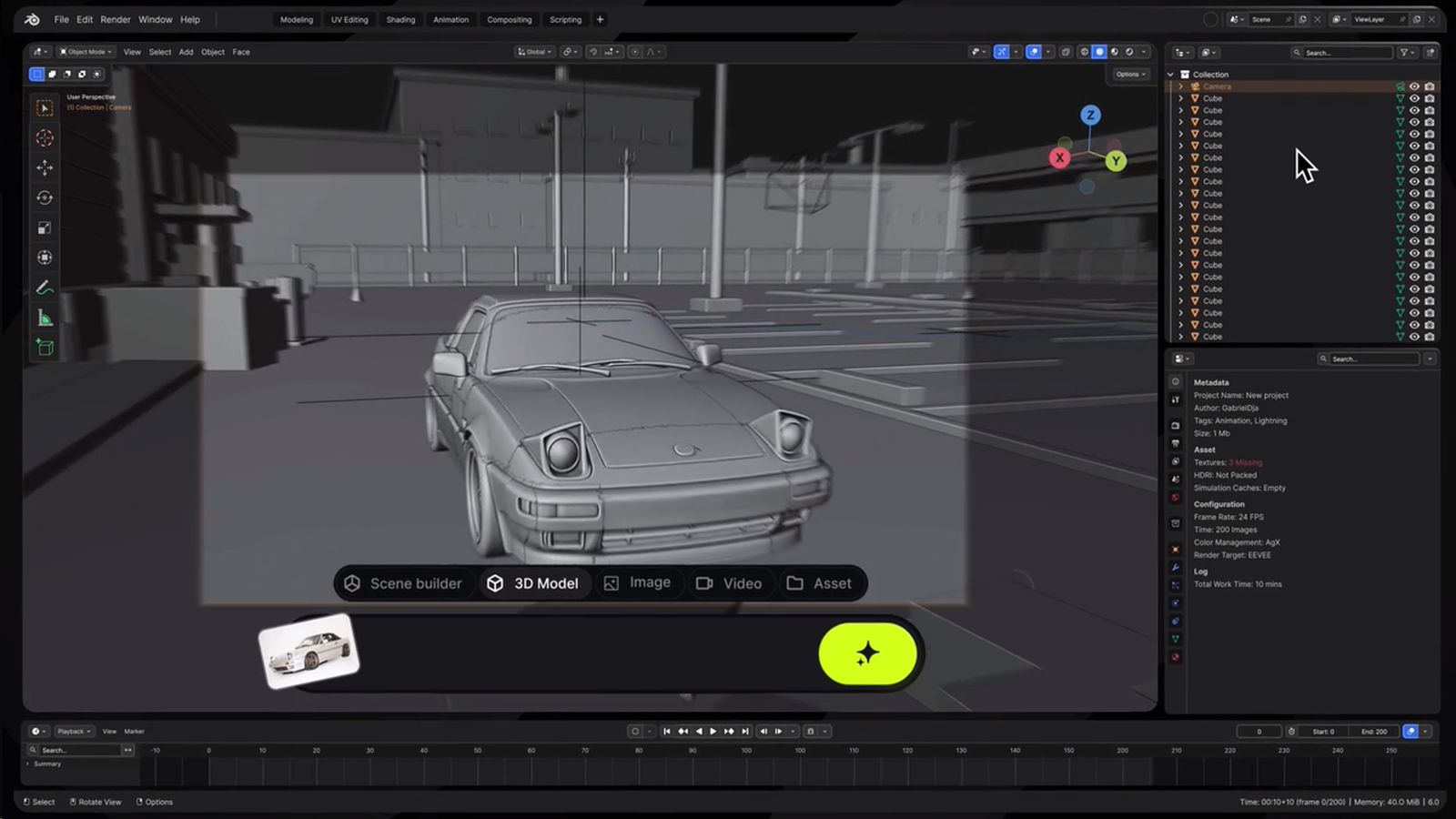
Higgsfield for Blender add-on
CGPress · cgpress.org ↗
Higgsfield, the AI-powered creative platform, has launched a dedicated add-on that brings its suite of generative tools directly into Blender, one of the most widely used open-source 3D applications in the world. The integration covers AI video generation, 3D asset creation, animation assistance, and scene-building capabilities, allowing artists to access these features without leaving their familiar Blender workspace. This kind of tight integration is significant because it removes the friction of toggling between separate applications, letting creators stay in a single, unified pipeline. The move reflects a broader industry trend of embedding AI generation tools at the application level rather than treating them as standalone web services. For Blender users already experimenting with AI-assisted workflows, the add-on represents a meaningful upgrade in both convenience and creative reach.

Gaussian Point Splatting video presentation
CGPress · cgpress.org ↗
Researchers at Delft University of Technology in the Netherlands have developed a new rendering technique called Gaussian Point Splatting that can handle hundreds of millions of Gaussian primitives at interactive frame rates — a scale that has historically pushed real-time rendering to its limits. Gaussian splatting has gained significant traction in recent years as a fast alternative to neural radiance fields for representing and rendering complex 3D scenes, but performance at extreme point counts has remained a challenge. The Delft team's method addresses that bottleneck, opening the door to far more detailed and densely captured environments being navigated in real time. The work was presented as a video, offering a practical demonstration of the technique's capabilities in action. If the approach proves robust and accessible, it could have meaningful implications for fields like virtual production, digital heritage preservation, and photorealistic scene reconstruction.

Creating a Geometry-Based Plugin That Makes Realistic Worn Edges
80.lv · 80.lv ↗
Artist and developer Cornelius Dämmrich has shared a detailed breakdown of Egdy, a procedural damage plugin he created for both Cinema 4D and Blender that focuses on the kind of wear and tear that makes 3D objects feel genuinely lived-in. The plugin ships with six distinct damage modules covering common real-world imperfections such as cracks, chips, and edge degradation — the subtle details that often separate convincing renders from sterile, overly perfect ones. Rather than relying on hand-painted textures or manual sculpting, Egdy takes a geometry-based approach, meaning the damage is generated procedurally and can be adjusted parametrically. Dämmrich walks through the design thinking behind each module, shedding light on how he translated real-world material behavior into controllable 3D tooling. For motion designers and visualization artists working in either application, Egdy offers a practical shortcut to the kind of tactile realism that typically demands significant time and skill.

Dissectible Anatomy Lets Users Cut & Tear Virtual Bodies in Real Time
80.lv · 80.lv ↗
Tim McGraw of Purdue University has developed a dissectible anatomy system that allows users to cut, tear, and explore virtual human bodies in real time, with the underlying simulation grounded in several sophisticated computational techniques. The system draws on position-based dynamics for its physically responsive deformation, signed distance fields to accurately represent and query complex anatomical volumes, and volumetric splats to render the results with convincing visual fidelity. Crucially, the source material comes from cryosection imagery — high-resolution photographs taken of frozen cadavers sliced at precise intervals — giving the models a level of anatomical authenticity that purely synthetic geometry cannot match. The ability to interactively cut and tear tissue in real time, rather than relying on pre-authored animations, makes the system particularly valuable for medical education and surgical training applications. It represents a meaningful step toward immersive anatomical tools that combine scientific accuracy with the kind of hands-on interactivity that accelerates learning.

Caustify – a free, open-source spectral dispersion path tracer
BlenderNation · blendernation.com ↗
A developer going by Immineal has released Caustify, a free and open-source spectral dispersion path tracer designed to address one of the longstanding approximations baked into mainstream renderers like Blender's Cycles. Standard RGB path tracers simulate chromatic dispersion — the phenomenon where glass and other transparent materials bend different wavelengths of light by slightly different amounts — by applying separate index-of-refraction values to red, green, and blue channels, a method that is fast but physically imprecise. Caustify instead traces light across a much broader spectrum of wavelengths, producing the kind of nuanced prismatic color splitting and caustic patterns seen in real-world optics. The result is a rendering experiment that prioritizes physical accuracy over render speed, making it more of a research and visualization tool than a production workhorse. For rendering enthusiasts and researchers interested in the physics of light transport, the open-source release offers both a compelling visual demonstration and a codebase worth studying.

SESSIONS: Interior – Six Blender Interior Scenes, Two Hours Each <span class="title-badge title-badge--paid" title="Paid"><svg xmlns="http://www.w3.org/2000/svg" viewBox="0 0 24 24" fill="currentColor" width="17" height="17" aria-hidden="true"><path d="M11 2a9 9 0 1 0 0 18A9 9 0 0 0 11 2zm1 14.93V18h-2v-1.07A4 4 0 0 1 7 13h2a2 2 0 0 0 2 2h1a1 1 0 0 0 0-2h-1a4 4 0 0 1 0-8V4h2v1.07A4 4 0 0 1 15 9h-2a2 2 0 0 0-2-2h-1a1 1 0 0 0 0 2h1a4 4 0 0 1 1 7.93z"/></svg></span>
BlenderNation · blendernation.com ↗
SESSIONS: Interior is a paid, project-based Blender course taught by instructor Sascha Feider that takes a focused, scene-by-scene approach to mastering interior visualization. Spread across six sessions, each running approximately two hours, Feider builds six complete interior vignettes from start to finish, giving students a front-row view of a professional's full creative process rather than isolated technique demonstrations. The course's structure is its core strength: by committing to one contained, polished scene per session, learners get repeated exposure to the entire workflow — lighting, shading, composition, and rendering — applied to different spatial contexts and aesthetic challenges. This kind of repetition within variety is particularly effective for building the kind of intuition that generalizes beyond any single tutorial. For Blender artists looking to develop a reliable, high-quality interior rendering practice, the course offers both practical skill-building and a portfolio of finished work at the end.